Ready for running challenges in Geometry Dash Meltdown Levels. Master tricky jumps to avoid colliding with hazards before reaching the finish line.
Skill-driven Gameplay of Geometry Dash Meltdown Levels
The three levels of Geometry Dash Meltdown share a common control system, but several mechanics can change how players approach individual sections. Understanding these elements makes it easier to respond to obstacles and avoid unnecessary mistakes.
Jump Pads and Jump Rings
Jump pads and jump rings help the character reach different heights or navigate specific obstacle arrangements. They are particularly important when the route includes elevated platforms, gaps, or hazards that cannot be cleared with an ordinary jump alone. Jump pads activate when the character makes contact with them, providing an assisted jump. Jump rings, by contrast, require timely player input when the character reaches the ring. Understanding this distinction is essential for maintaining control. To use these mechanics effectively, pay attention to the position of the next obstacle before activating a ring. Jumping too early or too late can change the landing position and leave the character exposed to another hazard.
Portals and Character Transformations
Portals introduce additional complexity by changing how the character moves or behaves. Depending on the portal type, players may encounter changes to character form, movement speed, or gravity.
- Form portals can transform the character into different movement modes, including a ship, ball, spider, robot, or UFO. These forms have different control requirements, so players must adapt instead of continuing to use the same movement strategy.
- Gravity portals alter the direction of gravity, which changes the relationship between the character and the platforms.
- Speed portals affect how quickly the level progresses, leaving less time to react when the character moves faster.
Understanding these mechanics is particularly useful when approaching a section where multiple changes occur close together. Look for the portal ahead, identify the movement mode that follows, and prepare to adjust your timing immediately after the transition.
Learning Different Movement Modes
Different character forms introduce different control challenges.
- Cube: Relies on timed jumps to clear spikes, gaps, and platforms.
- Ship: Requires controlled movement through the air, with careful attention to altitude.
- Ball: Changes its movement in response to gravity-switching inputs.
- Spider: Uses rapid teleport-like movement between surfaces according to its mechanics.
- Robot: Offers a different jumping style that rewards careful control of jump timing.
- UFO: Uses repeated airborne impulses to navigate obstacles.
Not every form appears in the same way throughout every stage, and the exact challenge depends on the section being played. The important lesson is to recognize that each form has its own movement behavior. A useful practice method is to focus on one movement type at a time. Learn how it responds to input, observe how it interacts with gravity, and then apply that knowledge when the course combines it with other mechanics.
Game controls
- Left mouse/ Spacebar: Jump or fly up.
- Z key: Drop gems.
- X key: Remove gems.
Game Modes in Geometry Dash Meltdown Levels
Practice Mode
Practice Mode is a great choice for players who want to learn the levels and improve their skills without having to start over every time they make a mistake.
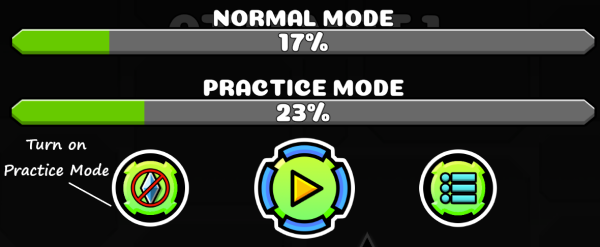
Figure 1. Practice Mode
To activate it, click the green button with a blue gem on the right side of the screen. While playing, you can place gems along the way to create checkpoints. If you hit an obstacle, you will respawn at the nearest checkpoint instead of returning to the beginning. You can also remove any checkpoints you no longer need. This mode is especially helpful for learning tricky jumps, understanding obstacle patterns, and getting used to different movement mechanics before attempting a full run.
Normal Mode
Once you feel confident with your skills, you can switch to Normal Mode by turning off Practice Mode.
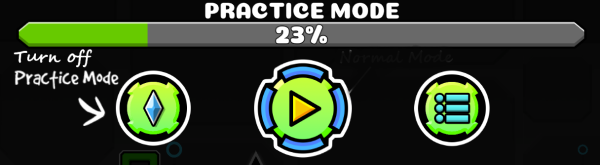
Figure 2. Normal Mode
Unlike Practice Mode, this mode does not allow you to rely on checkpoints placed along the level. If you collide with an obstacle, you must start the level again from the beginning. This makes every jump and movement more important, as even a small mistake can end your run. Although Normal Mode can be challenging, it is a great way to test your progress and see how well you have mastered each level. For the best experience, spend some time practicing difficult sections before taking on the challenge of completing a level in one continuous run.
Character Designs and Visual Customization
Before starting your adventures in Geometry Dash Meltdown, players can select between many characters.
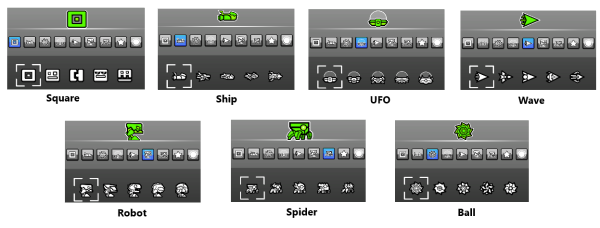
Figure 3. Character design
The classic cube is the main character, but players can also unlock different looks inspired by forms such as the ball, ship, spider, robot, and UFO. With their unique geometric styles, these designs fit well with the game's colorful visuals and give players more ways to customize their experience. However, character appearance and gameplay mechanics are two different things. Changing your character's look is purely cosmetic, while transforming into another form during a level changes how you move and control it. A new design might make your character look cooler, but it will not help you avoid spikes or get past tricky obstacles.